

SereneCare - A Smarter Way To Care
A clarity‑focused caregiving tool designed as part of Maven’s Transition Into UX for Healthcare course.
ABOUT
SereneCare is an AI‑enabled caregiving app designed to help families coordinate care, manage daily tasks, and make sense of health updates when supporting someone with a chronic condition.
Over several weeks in the Transition Into UX for Healthcare course, I explored how AI can reduce cognitive load, improve clarity, and support caregivers during moments that often feel overwhelming.
MY ROLE
UX Designer
TIMELINE
4 Weeks
TOOLS
Figma, CoPilot, Claude AI
The Challenge
Family caregivers often juggle:
-
Fragmented information across texts, notes, and conversations
-
Coordination with multiple caregivers
-
Managing medications, meals, appointments, and symptom tracking
-
Uncertainty about what matters and what requires urgent attention
These challenges create high cognitive load, emotional stress, and inconsistent decision‑making. Caregivers need clarity, not more data.
Research
My research focused on understanding the day‑to‑day realities of family caregivers supporting someone with a chronic health condition. I combined social listening research, and competitive analysis to uncover the core pain points that SereneCare needed to address.
SOCIAL LISTENING EXERCISE
I explored Reddit Forums to understand lived experiences of caregiving challenges. Several users on the forum, r/caregiversupport, mentioned the challenges they face while managing their caregiving duties:
Caregiving long-term is exhausting in ways people don't see. And memory gaps under stress are so real. Honestly, one of the most undertalked parts of caregiving. Your brain is already carrying so much, remembering every detail on top of that is just too much to ask.
I am helping care for a family member who sees multiple providers, and I’m finding it hard to keep everything straight: appointments, labs, meds, discharge notes, follow-ups, etc. Each clinic has its own portal, and none of them really talk to each other, so I end up being the “memory” in the middle.
COMPETITIVE ANALYSIS
The caregiving landscape has many missing pieces; most available apps focus on communication, coordination, and emotional support, but very few address the uncertainty and decision fatigue caregivers face. To understand and find the unique differentiator for my app, I conducted a competitive analysis across these three applications: Caring Village, CaringBridge, and IanaCare. Below is a table showing each app's strengths and weaknesses, along with potential differentiators for the SereneCare app that I am designing.

Key Findings
The Social Listening Exercise made it clear that:
-
Caregivers are overwhelmed by fragmented information scattered across texts, notes, and conversations.
-
They struggle to understand what matters most and what requires immediate action.
-
Coordinating with multiple caregivers often leads to misalignment and duplicated work.
-
Caregivers want clarity, not more data — especially during stressful moments.
Additionally, the competitive landscape reveals a clear pattern: existing apps focus on connection, not clarity.
Based on this analysis, the strongest opportunities for SereneCare lie in:
-
Providing Decision support: Helping caregivers know what to do, not just what happened.
-
Safety and risk management: Providing clear pathways for escalation and uncertainty.
-
AI transparency: Offering explanations and confidence levels to build trust.
-
Multi‑caregiver alignment: Detecting conflicting information and reducing miscommunication.
Design Iteration #1
Based on the research insights gathered from caregiver interviews, journey mapping, and task analysis, I translated findings into the first interactive concept for SereneCare. The goal was to address the fragmentation and cognitive overload caregivers experience by creating a system that surfaces clarity and actionable guidance.
KEY FEATURES
-
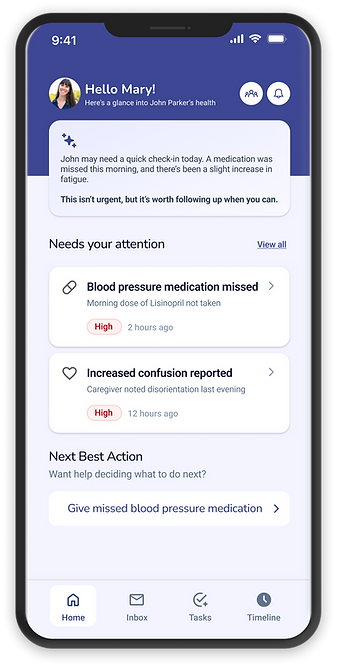
AI Health Summary — condenses daily updates into a concise overview of what changed and why it matters.
-
Task That Needs Attention — highlights items requiring immediate caregiver review.
-
Next Best Action — provides contextual guidance generated by AI to help caregivers decide what to do next.
-
Priority Inbox — color‑coded urgency levels to help triage tasks quickly.
-
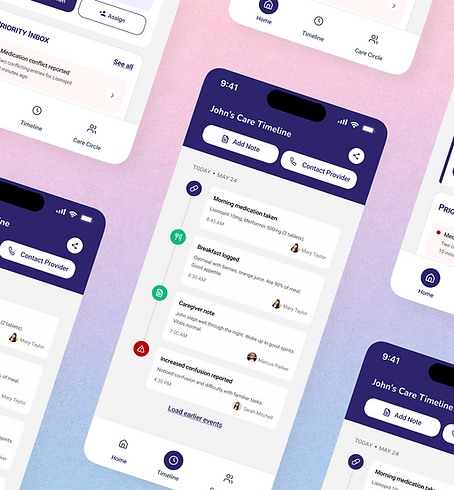
Care Timeline — visual history of health events and caregiver notes for continuity.
-
Shared Care Circle — enables multiple caregivers to stay aligned and informed.
Usability Testing
After developing the first prototype, I conducted remote usability sessions with 6 users to validate clarity, navigation, and emotional resonance.
Participants completed scenario‑based tasks such as reviewing current care status and taking the next best action and also reviewing care timeline.
KEY FINDINGS
-
Most participants found AI summary easy to understand, but wanted more context, as some were unsure whether the medication had been taken.
-
Participants liked the guidance but wanted reassurance that it wasn’t medical advice.
-
Additionally, they appreciated the timeline but wanted it only for updates, not for taking action.
Feature Prioritization Matrix
Before moving into my final design iteration,I created a Feature Prioritization Matrix to ensure that the product direction aligned with caregiver needs, technical feasibility, and the core goals of the experience. This step helped translate research insights into a clear, actionable roadmap for what SereneCare should focus on first.
HOW I PRIORITIZED
I evaluated each feature using two criteria:
-
Impact — How much it helps caregivers make decisions, stay organized, or reduce stress
-
Feasibility — How realistic it is to implement early, especially for an MVP
This resulted in a clear ranking across four tiers:
-
P0 — Must‑have for MVP
-
P1 — Important, but can follow
-
P2 — High‑value but more complex
-
P3 — Nice‑to‑have enhancements

AI for Faster Exploration
Final Design
COPILOT
Used to synthesize research insights and brainstorm alternative design directions.
CLAUDE.AI
Used for Ideation, generating natural-language summaries, and stress-testing flows for clarity.
FIGMA MAKE
Used to quickly explore UI variations and iterate on visual concepts.

After incorporating insights from usability testing, I refined SereneCare into a clearer, more supportive, and more trustworthy caregiving experience. The final design focuses on reducing cognitive load, improving task clarity, and strengthening communication across the care circle — all while ensuring that AI guidance feels transparent, safe, and human‑centered.
WHAT CHANGED BASED ON ITERATION #1
Based on feedback, I refined the experience in four key ways:
-
Improved visual hierarchy to make urgent tasks immediately recognizable
-
Simplified labels and microcopy to reduce cognitive effort
-
Added transparency cues explaining how AI generates recommendations
-
Enhanced spacing and grouping for better scannability and accessibility
Outcome
The final design successfully addressed the core challenges identified in research:
-
Caregivers felt more confident in understanding what needed attention
-
Decision‑making became faster and less overwhelming
-
The experience felt supportive, not intrusive
-
Shared caregiving became more aligned and coordinated
SereneCare evolved into a tool that transforms fragmented information into clear, manageable next steps, helping families navigate caregiving with more confidence and less stress.
Reflection
Working on SereneCare through Maven’s Transition Into UX for Healthcare course taught me how to design for the emotional and cognitive realities of caregiving. I learned the value of making uncertainty visible, supporting shared decision‑making, and creating calm, confidence‑building interactions in moments that often feel overwhelming.
If I were to continue the project, I would expand the research to include a wider range of caregiver contexts and strengthen patterns for conflicting information, low‑confidence AI outputs, and escalation moments. I’d also refine the AI‑assisted decision logic to communicate confidence levels in a way that feels more transparent and human.